您现在的位置是:网站首页> 编程资料编程资料
ASP.NET MVC5网站开发显示文章列表(九)_实用技巧_
 2023-05-24
350人已围观
2023-05-24
350人已围观
简介 ASP.NET MVC5网站开发显示文章列表(九)_实用技巧_
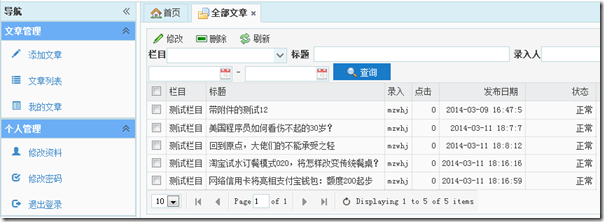
老习惯,先上个效果图:
1、在IBLL
在InterfaceCommonModelService接口中添加获取公共模型列表的方法
首先排序方法
////// 排序 /// /// 数据实体集 /// 排序代码[默认:ID降序] ///IQueryable Order(IQueryable entitys, int roderCode); 查询数据方法 /// /// 查询分页数据列表 /// /// 总记录数 /// 模型【All全部】 /// 页码 /// 每页记录数 /// 标题【不使用设置空字符串】 /// 栏目ID【不使用设0】 /// 用户名【不使用设置空字符串】 /// 起始日期【可为null】 /// 截止日期【可为null】 /// 排序码 ///分页数据列表 IQueryableFindPageList(out int totalRecord, int pageIndex, int pageSize, string model, string title, int categoryID, string inputer, Nullable fromDate, Nullable toDate, int orderCode);
2、BLL
在CommonModelService写方法实现代码,内容都很简单主要是思路,直接上代码
public IQueryableFindPageList(out int totalRecord, int pageIndex, int pageSize, string model, string title, int categoryID, string inputer, Nullable fromDate, Nullable toDate, int orderCode) { //获取实体列表 IQueryable _commonModels = CurrentRepository.Entities; if (model == null || model != "All") _commonModels = _commonModels.Where(cm => cm.Model == model); if (!string.IsNullOrEmpty(title)) _commonModels = _commonModels.Where(cm => cm.Title.Contains(title)); if (categoryID > 0) _commonModels = _commonModels.Where(cm => cm.CategoryID == categoryID); if (!string.IsNullOrEmpty(inputer)) _commonModels = _commonModels.Where(cm => cm.Inputer == inputer); if (fromDate != null) _commonModels = _commonModels.Where(cm => cm.ReleaseDate >= fromDate); if (toDate != null) _commonModels = _commonModels.Where(cm => cm.ReleaseDate <= toDate); _commonModels = Order(_commonModels, orderCode); totalRecord = _commonModels.Count(); return PageList(_commonModels, pageIndex, pageSize).AsQueryable(); } public IQueryable Order(IQueryable entitys, int orderCode) { switch(orderCode) { //默认排序 default: entitys = entitys.OrderByDescending(cm => cm.ReleaseDate); break; } return entitys; }
3、web
由于CommonModel跟我们前台显示的数据并不一致,为了照顾datagrid中的数据显示再在Ninesky.Web.Models中再构造一个视图模型CommonModelViewModel
using System; namespace Ninesky.Web.Models { /// /// CommonModel视图模型 /// /// 创建:2014.03.10 /// /// public class CommonModelViewModel { public int ModelID { get; set; } /// /// 栏目ID /// public int CategoryID { get; set; } /// /// 栏目名称 /// public string CategoryName { get; set; } /// /// 模型名称 /// public string Model { get; set; } /// /// 标题 /// public string Title { get; set; } /// /// 录入者 /// public string Inputer { get; set; } /// /// 点击 /// public int Hits { get; set; } /// /// 发布日期 /// public DateTime ReleaseDate { get; set; } /// /// 状态 /// public int Status { get; set; } /// /// 状态文字 /// public string StatusString { get { return Ninesky.Models.CommonModel.StatusList[Status]; } } /// /// 首页图片 /// public string DefaultPicUrl { get; set; } } }在ArticleController中添加一个返回json类型的JsonList方法
////// 文章列表Json【注意权限问题,普通人员是否可以访问?】 /// /// 标题 /// 录入 /// 栏目 /// 日期起 /// 日期止 /// 页码 /// 每页记录 ///public ActionResult JsonList(string title, string input, Nullable category, Nullable fromDate, Nullable toDate, int pageIndex = 1, int pageSize = 20) { if (category == null) category = 0; int _total; var _rows = commonModelService.FindPageList(out _total, pageIndex, pageSize, "Article", title, (int)category, input, fromDate, toDate, 0).Select( cm => new Ninesky.Web.Models.CommonModelViewModel() { CategoryID = cm.CategoryID, CategoryName = cm.Category.Name, DefaultPicUrl = cm.DefaultPicUrl, Hits = cm.Hits, Inputer = cm.Inputer, Model = cm.Model, ModelID = cm.ModelID, ReleaseDate = cm.ReleaseDate, Status = cm.Status, Title = cm.Title }); return Json(new { total = _total, rows = _rows.ToList() }); }
下面是做界面了,在添加 List方法,这里不提供任何数据,数据在JsonList 中获得
////// 全部文章 /// ///public ActionResult List() { return View(); }
右键添加视图
上面都是easyui-datagrid的内容。
总体思路是BLL中实现查询公共模型列表,web中添加一个JsonList方法调用BLL中的方法并返回列表的Json类型。然后再添加一个List调用JsonList用来显示。下篇文章做删除和修改操作,希望大家会持续关注。
您可能感兴趣的文章: